

More Deals,
Less Digging
Search Facebook Marketplace near you, compare asking prices, and create automatic searches. Turn on price-drop tracking to follow changes on saved matches.
- Price Analytics
- Receive Automatic Email Alerts
7-day trial. No card required.
Core introductory offer: $9.99/month (regular $19.99).
Need inspiration? Pick a product to try.
How a Hound search works
Explore a saved PlayStation 5 search.
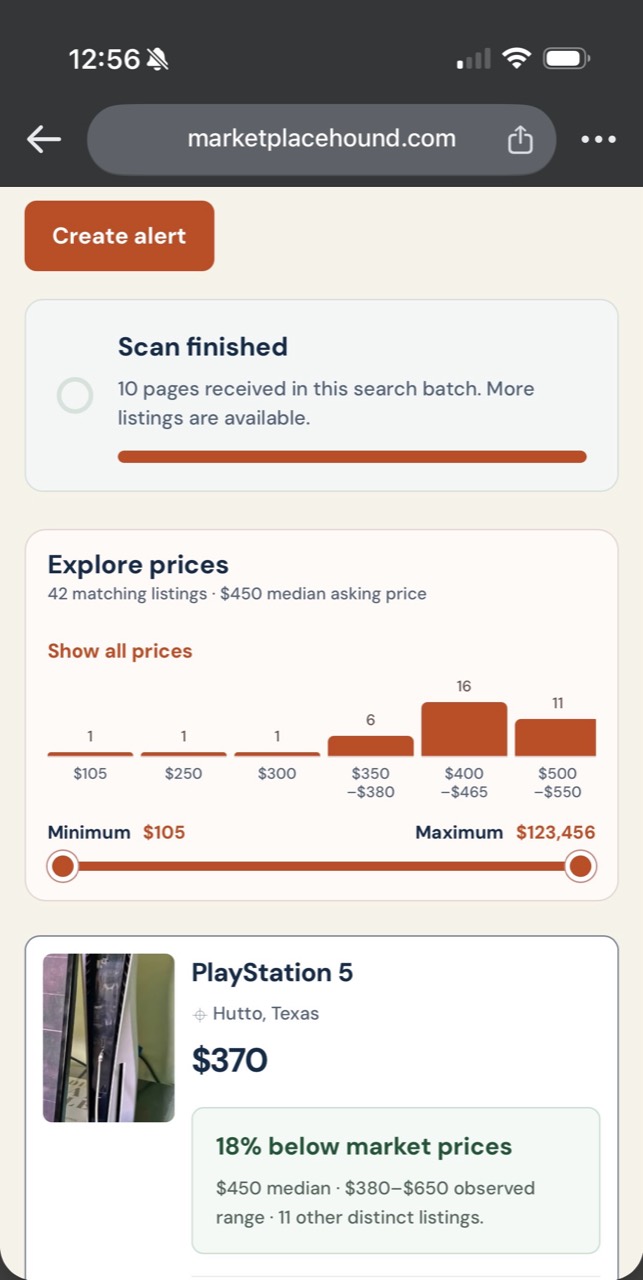
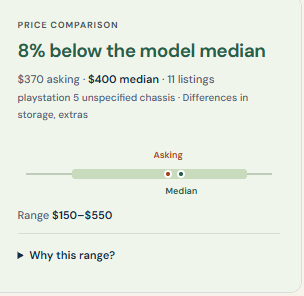
Is $370 a good price for a PlayStation 5?
See how an asking price compares with similar listings, including the price range and differences in the items being compared.
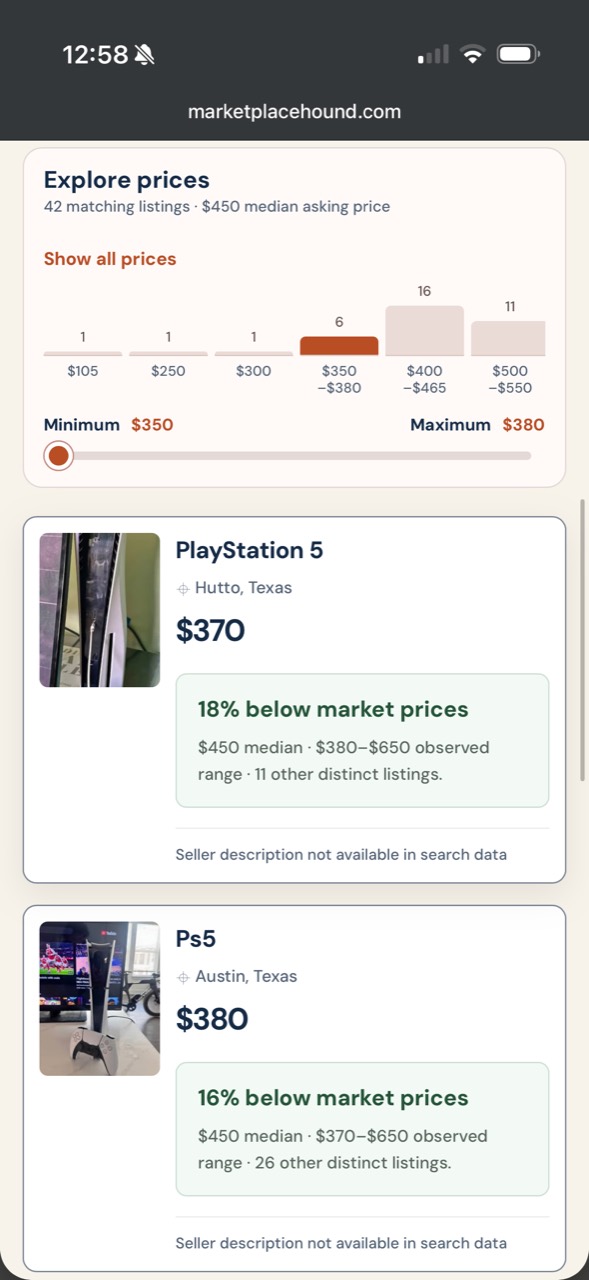
Which consoles fit your budget?
Set the range to $350–$380 and the $370 and $380 consoles stay on the list. Changing the filter doesn’t use another manual search.
Set up a searchBlack Friday Finds,
More Savings
Find a deal worth celebrating on Facebook Marketplace. From gaming consoles to speakers, Hound helps you compare local asking prices and look for gifts that fit your budget.
- 1Tell Hound what’s on your list
Choose a product, city, and search radius.
- 2Compare before you buy
See asking-price context when comparable listings are available.
- 3Let a saved alert keep watch
Choose email updates and optional price-drop tracking on saved matches.
7-day trial · No card required · Reduced trial allowances
Your wish list.
A clearer price picture.
Search, compare, save an alert.
All in your browser.
Savings depend on the listing and your purchase. Asking-price comparisons aren’t retail discounts. Alert checks depend on allowances and capacity.
Try Hound free
for 7 days.
Find local listings, compare asking prices, and let an alert keep watch. Take a week to see what Hound can find for you.
Start Your Trial AccountNo card required. No automatic paid subscription.
A real feel for Hound.
- Manual searches
- 3per day
- Active alert
- 1watching for you
- Trial accounts have reduced search limits and allowances.
- After the trial, choose a paid plan to keep searching.
Monthly pricing
Core membership is available. Subscribe from My account. Cancel future renewals there at any time.
View my accountCore Membership
$9.99 USD / month
Save $10/month Regular $19.99/month
- Manual searches
- 5 per day
- Active alerts
- 3 at a time
Billed monthly, plus applicable tax. Cancel anytime.
Trial vs Core
Explore Hound free for 7 days, then choose Core to keep searching.
| What’s included | TrialFree for 7 days | CorePaid monthly |
|---|---|---|
| Manual searches | 3 per day | 5 per day |
| Active alerts | 1 at a time | 3 at a time |
| Membership price | Free for 7 days only | $9.99 Regular Cancel anytime |
FAQ
How do I get email alerts for new Facebook Marketplace listings?
Run a local search in Hound, save it as an alert, and choose hourly or daily email updates. Emails report matches found during scheduled checks. Checks depend on allowances and capacity, and delivery can be delayed. You can review matches in Saved alerts.
How do I know if a Facebook Marketplace listing is a good deal?
Hound compares asking prices with similar listings when enough suitable data is available. Review the model median, price range, and supporting listings, then consider condition and included extras. These are asking prices, not completed sales; a lower price does not guarantee a bargain.
Can I use Marketplace Hound for reselling and flipping items from Facebook Marketplace?
Yes. Use local searches and asking-price comparisons to research potential inventory, then save alerts to keep watching. Optional price-drop tracking follows changes on saved matches during later checks. Assess condition, fees, pickup costs, and likely resale value yourself; Hound does not verify profit margins.
Do I need to install a mobile app or Chrome extension to use Marketplace Hound?
No. Hound works in your browser on a phone, tablet, or computer. No app download or browser extension is required. Start with a search, then sign in to use your account.
Can I use Hound today?
Yes. Registration is open to the public. Create your account for a 7-day trial with 3 manual searches per day and 1 active alert. No card is required, and the trial does not automatically become paid. Existing account holders can open Hound and sign in.
Is Hound part of Facebook or Meta?
No. Marketplace Hound is independent of Facebook and Meta.
Where do I contact the seller?
Open the original Facebook Marketplace listing to message the seller. You and the seller decide how to handle payment and pickup.
Can I use Hound on my phone?
Yes. Hound works in a browser on your phone, tablet, or computer. There’s no app to download.
How often are saved alerts checked?
Usually about once an hour. You can review matches in Saved alerts. Checks and emails can be delayed, and your alerts may not catch every listing.
Why do some listings have no price comparison?
Hound needs enough similar listings to compare asking prices. If there aren’t enough, you’ll see “Not enough comparable listings.”
What allowances come with Core Membership?
You get 5 manual searches a day and up to 3 active alerts at a time. Your alerts share up to 150 automatic requests per day across your account, within your shared 310-credit daily ceiling. One check can take several requests.
What counts as a manual search?
“Search listings” and “Search more listings” each use one manual search, covering up to 10 pages of results. Filtering those results or saving an alert doesn’t use another search.
Does “Show 3 more listings” use another search?
No. Showing three more results may use 0–3 of your 50 daily extra listing-detail lookups, within your shared daily credits. Hound only uses a lookup when it needs fresh details.
When do my allowances reset?
Daily allowances reset at midnight UTC and don’t roll over. If you run out, new searches or alert checks wait for the reset; your saved matches stay available. Pausing or deleting an alert, or letting it expire, frees its slot right away. My account shows your usage and local reset time.
How do I cancel my Core membership?
Open My account → Subscription, choose “Cancel subscription,” and confirm. Access continues through your paid period. Cancellation doesn’t automatically refund earlier charges. If you need help, contact support or read the cancellation and refund terms.