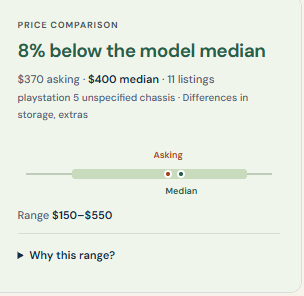
A RECORDED COMPARISON$370 asking · $400 model median 8% below, rounded · 11 comparable listings
Recorded example, not a live offer or valuation.
01
Read the model comparison
When enough suitable listings are available, Hound shows a model median, observed price range, and supporting listing count. The percentage compares the asking price with that model median. It describes the comparison; it does not establish fair value or confirm a bargain.
02
Keep the search overview in perspective
A search-wide price distribution may include different models and bundles. Use it to explore the results, then look at a listing’s model comparison for more specific context. Adjusting price controls on loaded results does not spend another manual search.
03
Check what is actually included
Storage, condition, accessories, and the exact model can change how useful a comparison is. Read the listing details and ask the seller about anything unclear. Listed cities provide approximate location context, not a verified pickup address.
04
Know when the evidence is limited
Hound shows “Not enough comparable listings” when the comparison cannot be supported. Asking prices are not completed sale prices, and the available listings do not cover the entire market. You may need additional research before making an offer.
Marketplace Hound is independent of Facebook and Meta. Purchases and seller conversations take place through the original listing.